
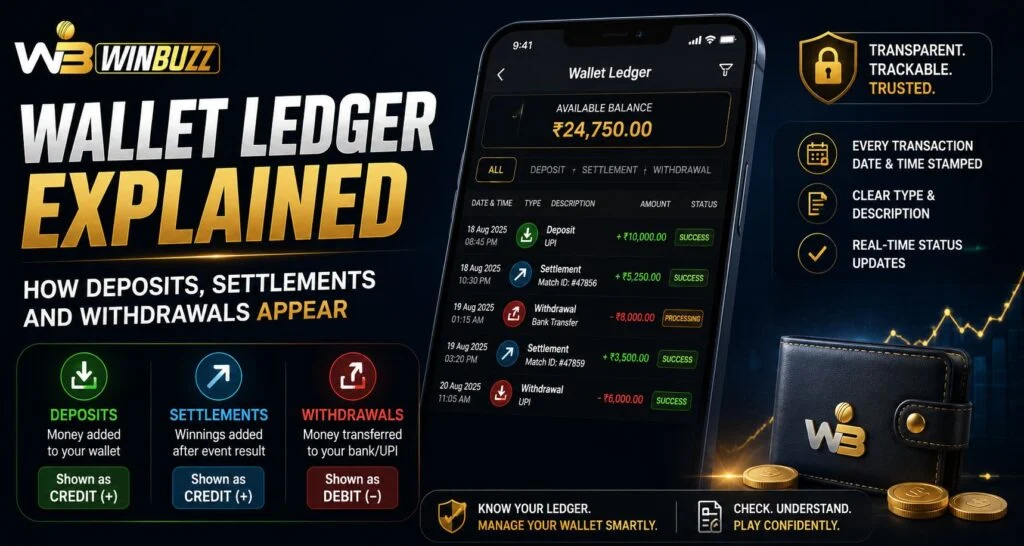
Understanding wallet activity is important for keeping track of account balances and transaction history. A wallet ledger works like a detailed record that shows every financial movement connected to an account, including funds added, settled transactions, and withdrawals. For Winbuzz users, learning how ledger entries work can make it easier to understand why balances change after different activities. Instead of only checking the final balance, reviewing the ledger provides a clearer picture of where every transaction comes from.
What Is a Wallet Ledger?
A wallet ledger is a chronological record of all account-related transactions.
It does not only show the current balance. Instead, it explains the individual actions that caused the balance to increase or decrease.
A typical ledger may include:
- Transaction date and time
- Transaction type
- Amount added or removed
- Reference number
- Settlement details
- Updated balance after the transaction
After completing a Winbuzz Login, users may find this information under wallet history, transaction history, or account records depending on the available account features.
Why Is a Wallet Ledger Useful?
A wallet ledger helps users understand account activity without relying only on memory.
For example, if a balance changes unexpectedly, the ledger can help identify whether the change happened because of:
- A deposit
- A completed settlement
- A withdrawal request
- A refund or adjustment
- A previous transaction result
The ledger acts as a transparent timeline that connects every balance movement with a specific event.
How Deposits Appear in a Wallet Ledger
A deposit entry represents money added to the account wallet.
When a deposit is completed successfully, the ledger may show details such as:
- Deposit amount
- Payment method used
- Transaction reference
- Date and time
- Updated wallet balance
For someone using the Winbuzz App, checking the deposit entry can confirm whether funds have been successfully credited.
However, users should understand that a payment initiation and a completed deposit are not always the same thing. Some transactions may remain pending until the payment provider confirms completion.
Understanding Pending and Completed Deposits
Payment processing can involve several stages.
A deposit may appear as:
Pending
The payment request has been created, but confirmation has not yet been received.
Completed
The funds have been successfully added to the wallet.
Failed or Cancelled
The transaction was not completed and the balance should not be updated.
Users checking Winbuzz Com should review the transaction status rather than assuming that every initiated payment immediately becomes available.
How Settlements Appear in a Ledger
Settlement entries are created when a completed activity is finalized and the corresponding balance adjustment is processed.
A settlement entry may show:
- Settlement date
- Result status
- Amount credited or deducted
- Reference details
- Updated balance
The settlement process explains why the wallet balance may change after the final outcome of an event or transaction is confirmed.
For example, a temporary pending entry may later become a final settlement entry once the system completes processing.
Why Settlement Timing Can Differ
Users may notice that some transactions appear immediately while others take longer.
Possible reasons include:
- Event completion time
- System processing
- Verification checks
- Payment provider confirmation
- Settlement calculations
Someone reviewing activity through a Winbuzz ID should focus on the final ledger status rather than only the first transaction notification.
How Withdrawals Appear in a Wallet Ledger
A withdrawal entry records money being moved out of the wallet.
Common withdrawal details include:
- Requested amount
- Withdrawal date
- Processing status
- Payment destination details
- Final completion status
A withdrawal may move through different stages:
Requested
The withdrawal has been submitted.
Processing
The request is being reviewed or handled.
Completed
The funds have been successfully transferred.
Rejected or Cancelled
The withdrawal was not completed.
Keeping track of these stages helps users understand why the available balance may change during the process.
Available Balance vs Ledger Balance
One important difference is between the current available balance and the complete ledger record.
The available balance shows how much money can currently be used.
The ledger shows:
- Previous transactions
- Pending activities
- Completed adjustments
- Historical balance changes
For example, a pending withdrawal may reduce available funds before the final transfer is completed because the amount is reserved for processing.
How to Read a Ledger Correctly
When reviewing wallet history, users should check each entry carefully.
Important details include:
- Transaction type
- Date and time
- Amount
- Status
- Reference number
- Balance after transaction
A single balance figure does not always explain the complete story. The ledger provides the background behind every change.
Common Wallet Ledger Mistakes to Avoid
Users sometimes misunderstand ledger entries because they only focus on the final balance.
Common mistakes include:
- Confusing pending transactions with completed ones
- Ignoring transaction dates
- Missing adjustment entries
- Assuming deposits and settlements work the same way
- Not saving transaction references
Regularly reviewing wallet history can help identify issues quickly.
Why Keeping Transaction Records Matters
Maintaining awareness of wallet activity improves account management.
Transaction records can help when:
- Checking payment status
- Reviewing previous activity
- Understanding balance changes
- Communicating with support
- Identifying unfamiliar entries
Winbuzz Login users should make it a habit to review transaction history whenever they need clarity about wallet movements.
Final Thoughts
A wallet ledger provides a complete view of how money moves through an account. Deposits show funds entering the wallet, settlements record finalized adjustments, and withdrawals track money leaving the account.
For Winbuzz users, understanding ledger entries makes balance tracking easier and helps avoid confusion when transactions move through different stages. Instead of checking only the final amount, reviewing the complete transaction history provides a clearer understanding of account activity.
FAQs
What is a wallet ledger?
A wallet ledger is a detailed record of all transactions that affect an account balance, including deposits, settlements, and withdrawals.
Why does my balance change after settlement?
A settlement updates the wallet after a transaction outcome has been finalized and the related amount is processed.
What does a pending wallet transaction mean?
A pending transaction means the process has started but has not yet reached final completion.
Can I check previous wallet activity?
Yes. Wallet history or ledger sections usually display previous transaction records and balance changes.
Why should I review wallet ledger entries?
Reviewing ledger entries helps users understand balance changes, track payments, and identify any unexpected activity.


